I like Pipedrive, I’ve used CRMs for years, built sales processes for clients, connected systems together and spent a slightly ridiculous amount of time thinking about how to make sure leads actually get followed up rather than disappearing into somebody’s inbox.
But I also kept coming back to a fairly simple question; Why does a small business CRM need to become another monthly subscription?
Particularly now, when the way we interact with software is changing pretty quickly.
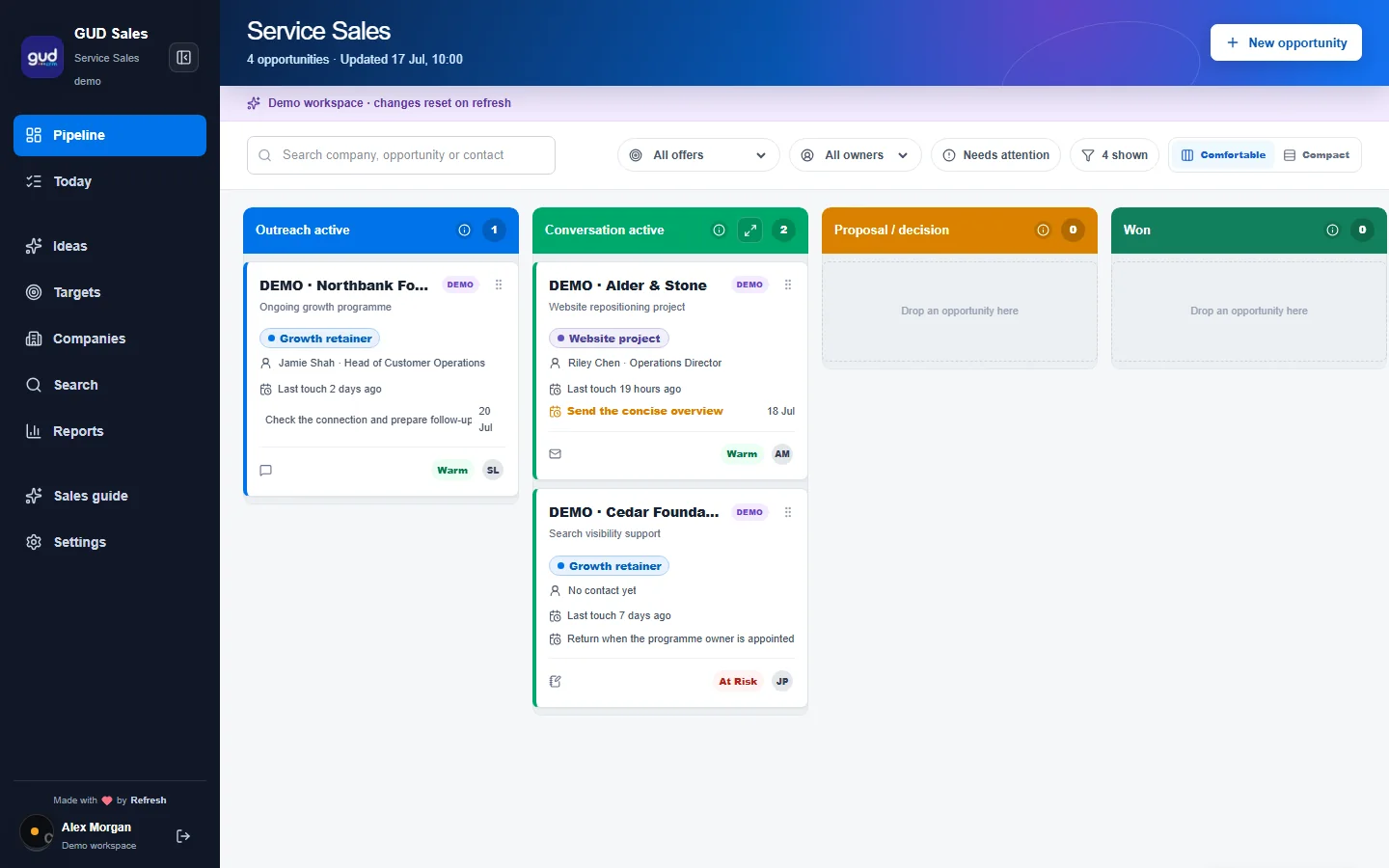
So we built GUD CRM, a completely free, open source CRM that gives you the useful parts of a sales pipeline, contacts, companies, opportunities, notes, follow-ups and visibility of what is actually going on, but without another per-user monthly bill.
…And because we built it now rather than ten years ago, we have approached some of the interaction differently too. You can use your voice to add information quickly, and GUD CRM includes an MCP connection so tools like ChatGPT and Claude can interact with your CRM data directly.
It is basically our answer to the question: what would a simple CRM look like if you started again in the age of AI?
A free Pipedrive alternative, but not a Pipedrive clone
Press Play Above to Watch the Walk through
If you search for a free Pipedrive alternative, there are plenty of CRM systems out there, ranging from cut-down free plans through to fairly substantial open source platforms, but our aim with GUD CRM was not to recreate every possible CRM feature.
It was to make the bit most small businesses actually need really easy.
You have people, companies, deals, pipelines, activities and notes, so you can see who you are talking to, what might happen next, how much an opportunity could be worth and what needs following up.
That sounds obvious, but one of the biggest problems I have always had with CRM systems is not whether they technically have enough features, it is whether you actually keep them updated.
Because a beautifully configured CRM containing information from three weeks ago is not particularly useful, and that is where voice becomes surprisingly important.
So rather than finishing a call, opening your CRM, finding the contact, clicking through several boxes and writing an update, the idea is that you can capture what happened much more naturally – You can say something along the lines of:
“Spoke to Sarah at Acme this morning. They are interested in the new website project, probably around £4,000, follow up next Thursday after their management meeting.”
That is much closer to how people actually think after a conversation, the less effort it takes to get information into the CRM, the more likely the CRM is to contain useful information when you need it.

The other big difference is that your AI can use it too
This is the bit I really wanted to build for this (and I find particularly interesting):
GUD CRM has MCP, or Model Context Protocol, built into it, which means compatible AI tools can connect to your CRM and work with the information inside it.
So rather than always going into the CRM and clicking around yourself, you can interact with it through ChatGPT, Claude or another MCP-compatible assistant, you might ask chatGPT:
“Who do I need to follow up this week?”
Or:
“Show me all the opportunities over £5,000 that haven’t been contacted recently.”
Or:
“What have I got in the pipeline with manufacturing companies?”
You can also go the other way and add information.
You might finish writing an email in ChatGPT and say:
“Add a note to the Smithson eshop opportunity that I’ve sent the revised proposal today and remind me to follow up on Monday.”
That begins to make the CRM feel less like a separate database you have to remember to maintain and more like part of the normal way you work.
Pipedrive itself is moving in this direction too and now offers an MCP connection for its customers, which I think is a pretty good indication of where CRM software generally is heading – The difference with GUD CRM is that this approach has been part of what we wanted the product to be from the start, while keeping the underlying CRM completely free and open source.
Why open source?
Because I wanted it to be.
There isn’t a complicated pricing ladder where the useful feature you eventually need suddenly appears on the next package up, and we are not trying to lock your customer database into something you have to keep paying for forever.
GUD CRM is available as an open source project, so technically minded users can install it themselves, host it themselves, modify it and contribute to it.
That makes it particularly interesting if you are looking for an open source Pipedrive alternative, a self-hosted CRM, or simply a small business CRM where you want more control over where your data lives and how the system develops.
It also means I can keep experimenting with it.
Voice input is one example. MCP is another. There will undoubtedly be other ways of interacting with business software over the next few years that we haven’t even settled on yet, and an open product gives us room to explore those without having to work backwards from a SaaS pricing model.
Is GUD CRM better than Pipedrive?
That is probably the wrong question.
Pipedrive is an established commercial CRM with a huge number of integrations, automation options, reporting tools and features for larger sales teams. If your company needs all of that, it may be exactly the right product.
GUD CRM is deliberately smaller.
If you are a freelancer, consultant, agency, small business or small sales team and what you really need is somewhere clear to keep your contacts, opportunities, conversations and next actions, then you may not need an enormous CRM platform.
And if you already spend a lot of your working day inside ChatGPT or Claude, the ability to ask questions of your CRM and update it through natural language starts to become particularly useful.
That is really the experiment behind GUD CRM.
Can the CRM disappear into the way we already work?
Can I talk to it when I am driving back from a meeting? Can ChatGPT tell me what needs attention this morning? Can an AI assistant look through the pipeline with me and spot something I have forgotten? Can I update a sales opportunity without opening six different screens?
That interests me considerably more than adding another 40 buttons to a dashboard.
Want to try it?
GUD CRM is completely free and open source.
You can download it, install it yourself and run your own copy, and if you are comfortable with servers and Docker then you can get stuck in without us at all.
If that sentence made you immediately lose interest, we can also just set it up for you.
GUD CRM Setup: £99
We will install your own hosted version of GUD CRM, get the basics configured and help you get started, including connecting the MCP functionality so you can begin using it with compatible AI tools such as ChatGPT or Claude.
No giant software implementation. No sales demo followed by an enterprise pricing spreadsheet. Just a useful little CRM that you can start putting people and opportunities into.
And if you are already using Pipedrive, a spreadsheet, Notion, a notebook, your inbox, or the surprisingly common CRM known as “I mostly remember it in my head”, I would be genuinely interested to know what you think.
Take a look at GUD CRM, try it for free, or get in touch with Refresh Creative if you’d like us to set it up for you.


Comments are closed.